Multitenancy
Full-featured runtime tenant management is available in Workflow Engine Web API. It supports static startup tenants, dynamic tenant registration, request-scoped tenant snapshots, tenant-aware authorization, and tenant-scoped Data/RPC API operations. Read more about it here.
Overview
Multitenancy is a type of architecture that enables several clients or multiple customer applications to share the same computational resources. These clients are known as tenants, and they have some measure of customization for the shared resource.
This form of sharing applies to software resources as well as hosting on servers to achieve efficiency and reducing cost. It allows multiple instances of the given application to operate in a shared environment.
There is only one set of infrastructure to deploy and maintain, and all tenants use it. Workflow Engine supports multitenancy in two complementary ways:
- Multiple tenants can share one runtime and one database while their process data is separated by tenant id columns. This is the model called logical tenants.
- Different tenant groups can use different
WorkflowRuntimeinstances and different databases, which is the model used by Workflow Engine Web API physical tenants.
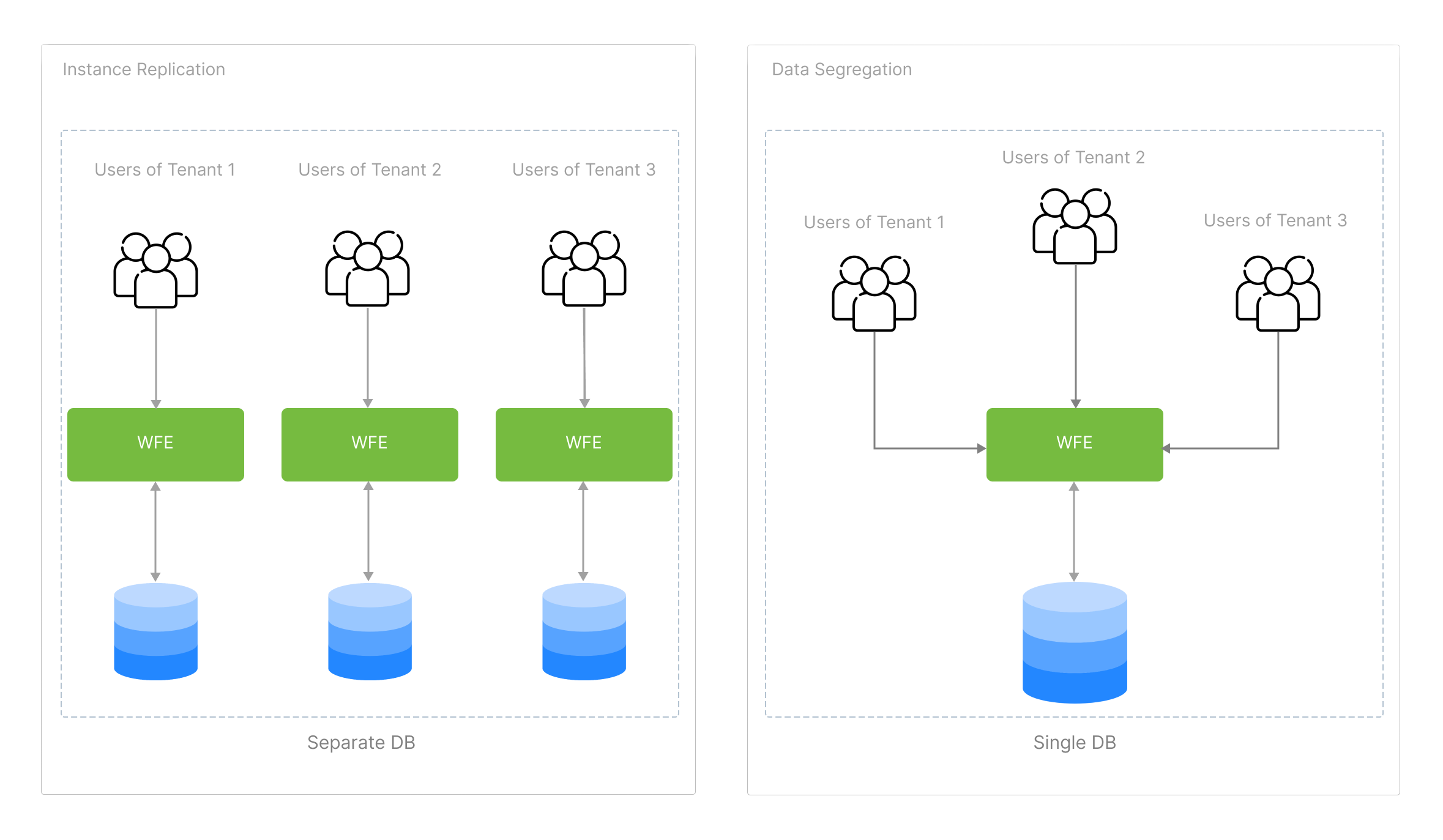
Multitenancy Support in Workflow Engine
A Tenant Id is passed at process creation and cannot be changed later. A Tenant Id is a string.
var createInstanceParams = new CreateInstanceParams("SchemeCode", processId)
{
    TenantId = "TenantId"
};

await workflowRuntime.CreateInstanceAsync(createInstanceParams);
After setting it, you can get the Tenant Id value from the process instance:
string tenantId = processInstance.TenantId;
The tenant id is stored with process-related persistence data, including process instances, process statuses, persistent parameters, timers, transition history, inbox entries, and approval history. Runtime APIs that load or change a process validate the process tenant in tenant-scoped contexts, so a process id from another tenant cannot be used to read or manipulate that process.
Tags of Schemes
Each process scheme can be assigned a set of tags. Further, you can search for schemes with the given tags. For example, if you want to allow access to a scheme for selected tenants only, you can use the tags of this scheme.
Tags of Schemes in Workflow Engine
You can set tags either programmatically or in the schemes designer.
Using a code:
workflowRuntime.Builder.AddSchemeTags("SchemeCode", new List<string>() {"tag1", "tag2"});
workflowRuntime.Builder.RemoveSchemeTags("SchemeCode", new List<string>() {"tag1", "tag2"});
Using the schemes designer:
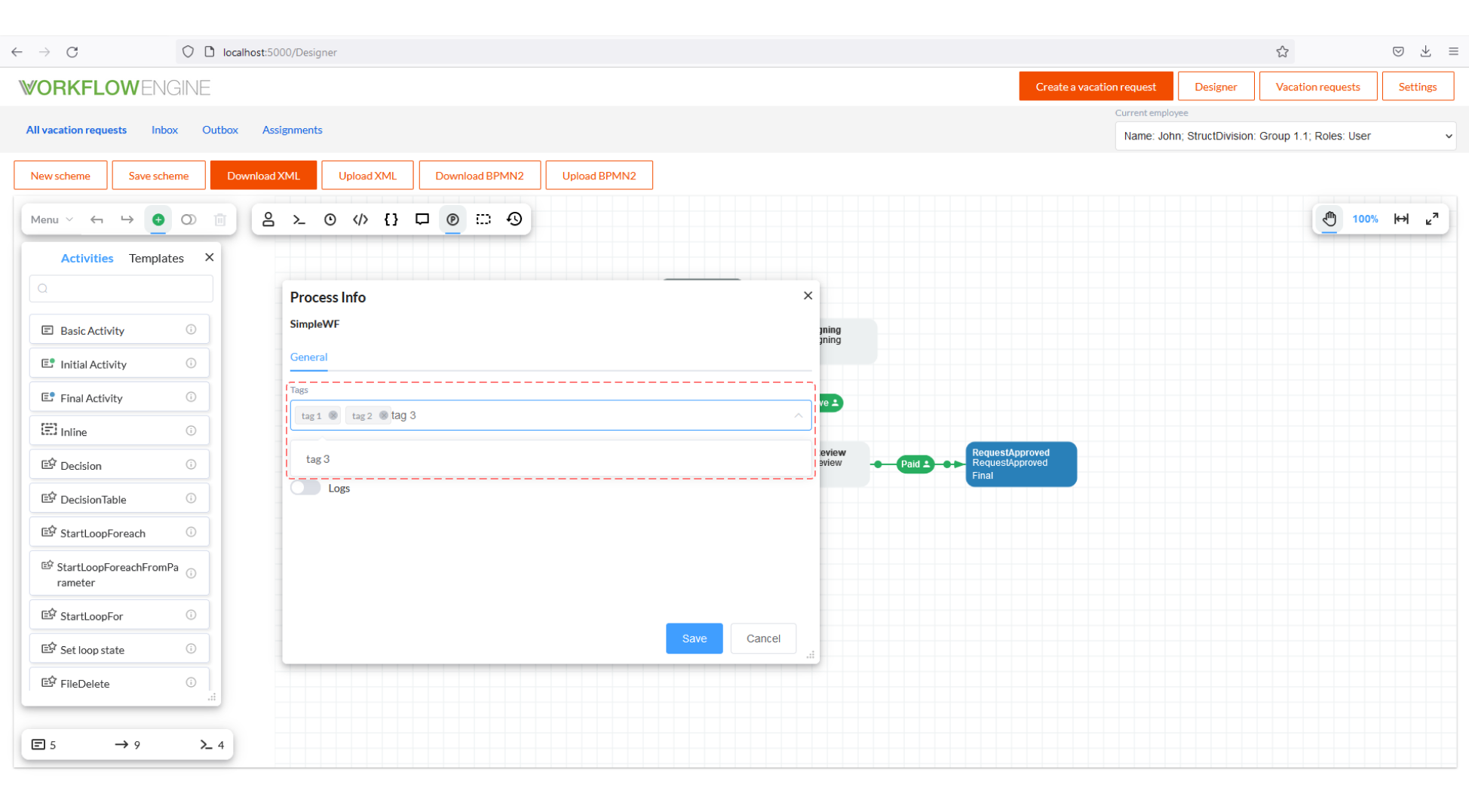
You can find scheme codes by tags using the following instruction:
await workflowRuntime.GetSchemeCodesAsync(new List<string>() {"tag1", "tag2"});
The search condition is OR. That is, the method returns all scheme codes with at least one of the tags indicated.
Tenant-Specific Schemes
Workflow Engine schemes can be shared or tenant-specific:
- Shared schemes have
TenantId = nullor an empty tenant id. - Tenant-specific schemes have a named tenant id.
When a tenant id is specified, Workflow Engine resolves schemes from the tenant scope and the shared scope with distinct scheme codes. Tenant-specific schemes take precedence for the same code. When no tenant id is specified, only shared schemes are used.
ProcessDefinition sharedScheme = await workflowRuntime.Builder.GetProcessSchemeAsync("SchemeCode");
ProcessDefinition tenantScheme = await workflowRuntime.Builder.GetProcessSchemeAsync("SchemeCode", "TenantA");
Scheme tags are tenant-aware in the same way. Calls without a tenant id work with shared schemes, while calls with a tenant id use the tenant-aware scheme lookup and tag operations.
Tenant Global Parameters
Workflow Engine provides a tenant-bound Global Parameters API. Use it when a setting or custom value must be isolated by tenant:
var parameters = workflowRuntime.GetTenantGlobalParameterApi("TenantA");

await parameters.SaveAsync("MyType", "MyName", "MyValue");
var value = await parameters.LoadAsync<string>("MyType", "MyName");
You can also bind the API to the tenant of a process instance:
var parameters = processInstance.GetTenantGlobalParameterApi();
If the tenant id is null, empty, or whitespace, the API uses shared global parameters.
Tenant-Specific Forms
The Forms provider API supports tenant-specific forms. Form reads use shared forms as a bootstrap/fallback source, while writes and deletes affect only the exact target scope:
GetFormNamesAsync(tenantId)returns distinct names from the tenant scope and shared scope.GetFormVersionsAsync(name, tenantId)returns tenant versions when the tenant has rows for the form; otherwise it falls back to shared versions.- Latest form reads prefer the tenant scope and fall back to the latest shared form only when the tenant scope is empty.
- Exact version reads fall back to the shared scope only when the tenant has no rows for that form.
- Create, update, and delete operations write only to the requested tenant scope, or to the shared scope when
tenantIdisnull.
Workflow Engine Web API
Workflow Engine Web API builds on these tenant features and adds host-level tenant management:
AddWorkflowRuntime(...)configures a single tenant.AddWorkflowTenants(...)registers startup tenants for multi-tenant hosts.IWorkflowTenantRegistry.RegisterTenantsAsync(...)andUnregisterTenantsAsync(...)add and remove tenants at runtime.IWorkflowTenantSnapshotgives each request an immutable view of the registered tenants.IWorkflowTenantLocatorresolves the current tenant id, tenant instance, andWorkflowRuntimefrom the HTTP request.
The Web API Data API is tenant-scoped. Generic scheme and global parameter Data API writes use the current HTTP tenant, and process-related Data API endpoints do not expose data from other tenants. The RPC API also runs process operations under strict tenant validation.