Get Started
Most business apps eventually develop a "workflow problem."
Approvals start simple, then you add roles. Then exceptions. Then “send it back to draft”. Then audits. Then a second department shows up. Suddenly your codebase is a museum of if/else branches and half-manual procedures.
Workflow Engine lets you describe these flows as a scheme (a blueprint) and run them as process instances (living executions with state and history). You describe your domain logic — the engine keeps your process predictable.
A scheme is the blueprint
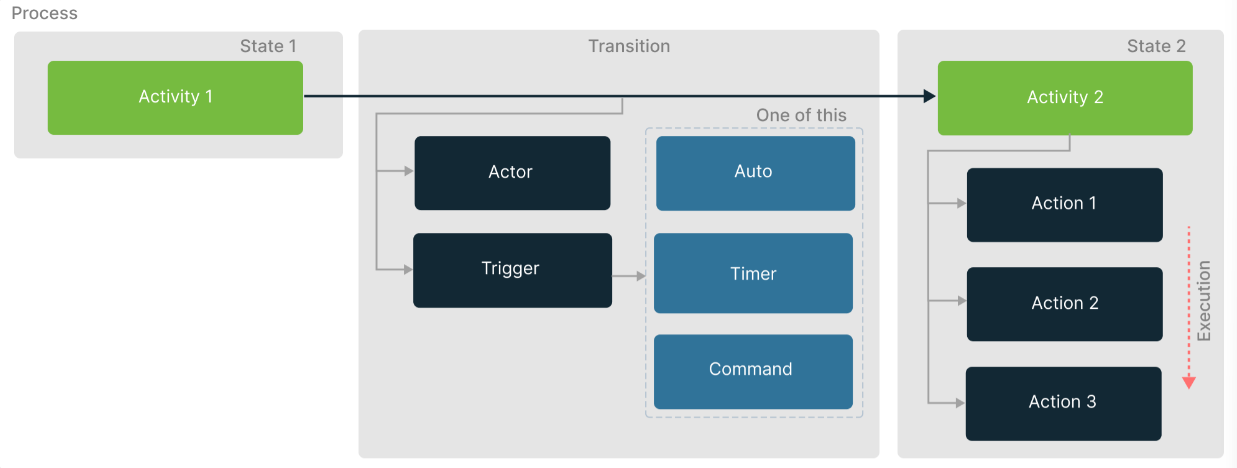
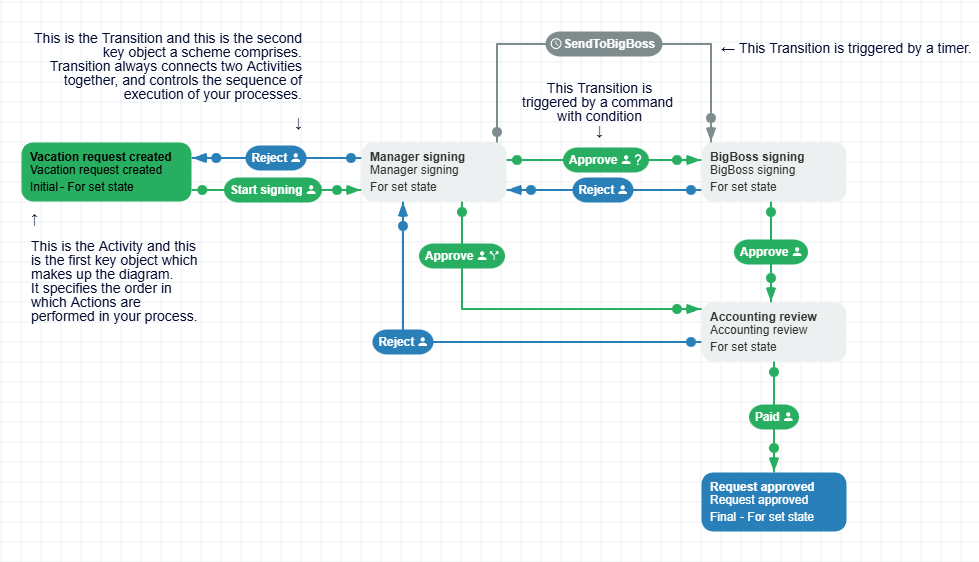
A Workflow Scheme describes what your business process looks like:
- Activities — the states of your process (e.g., Draft → Review → Approved).
- Transitions — allowed moves between Activities, with triggers and conditions.
- Commands — what users/APIs trigger to move a process (e.g., Approve, Reject).
- Actions — your custom code (call an API, write to ERP/CRM, send email, etc.).
- Rules / Actors / Restrictions — who is allowed to execute which commands.
- Process Parameters — data that affects branching, conditions, loops, and decisions.
A process instance is a living execution
A process instance is one run of your scheme for one business entity.
A typical flow in an app looks like this:
- Call CreateInstance — start a process for your entity (e.g., one document, one request, one ticket).
- Wait for execution — the process moves through the defined steps until it needs a command execution.
- Call GetAvailableCommands — ask the engine which commands this user or external service can execute right now.
- Call ExecuteCommand — run the chosen command and move the process forward. (e.g., submit, approve)
Your app stays clean: the engine validates permissions and transition conditions, executes your actions, enforces thread-safe state storage, and handles the rest of the workflow mechanics consistently.
Designing a workflow
You can create a scheme in code or XML, but the most approachable option is an embeddable visual editor: Workflow Designer.
- It’s a vanilla JavaScript UI component, so you can embed it almost anywhere.
- If you live in frameworks, there are examples for React and Angular.
- Or use it as part of the ready-made admin panel in Workflow Server.
Once you have a scheme, you can store it, version it, and reuse it across many processes.
Scheme changes handled gracefully
Workflows evolve. Policies change. Teams change. Your Scheme will change too.
Workflow Engine supports scheme versioning, so you can update a scheme without panicking about already-running instances. Keep old instances stable, migrate when you’re ready, and move forward without breaking changes.
Choose your integration path
If you’re ready to try it hands-on, pick the approach that matches your product and team.
Option A — Embed in your ASP.NET Solution (recommended for most teams)
Choose this when you want full control and tight integration with your domain code.
- Best fit when you already ship ASP.NET services and want a clean, scalable solution.
- Engine runs as part of your service (or alongside it).
- Easy to connect to your auth model, user roles, and business data.
- Includes extra features such as a ready-made HTTP API and a hybrid multi-tenant setup.
→ Next: ASP.NET Web API Quickstart
Option B — Standalone Workflow Server (ready to run)
Choose this when you want something out of the box.
- A product built on top of Workflow Engine.
- Includes an admin UI and operational pieces you’d otherwise build yourself.
- Great for fast pilots, internal tooling, or teams without deep .NET customization needs.
→ Next: Workflow Server Overview
Option C — Framework-agnostic Library (advanced scenarios)
Choose this if ASP.NET is not your core stack, or you need a minimal engine footprint.
- Useful for legacy systems or atypical hosting.
- Some features may be limited compared to the Web API path.
→ Next: Framework-agnostic Setup
Technical specifications
Supported .NET versions
Below is a list of Workflow Engine NuGet packages and the .NET versions they are compatible with.
.NET compatibility table
For .NET Standard version support, use Microsoft's compatibility table.
| Package Framework Version | .NET Implementation | Version Support |
|---|---|---|
| netstandard2.0 | .NET Core | 2.0, 2.1, 2.2, 3.0, 3.1, 5.0, 6.0, 7.0, 8.0, 9.0, 10.0 |
| netstandard2.0 | .NET Framework | 4.6.1, 4.6.2, 4.7, 4.7.1, 4.7.2, 4.8, 4.8.1 |
| netstandard2.1 | .NET Core | 3.0, 3.1, 5.0, 6.0, 7.0, 8.0, 9.0, 10.0 |
| 6.0 | .NET Core | 6.0, 7.0, 8.0, 9.0, 10.0 |
Workflow Engine Web API packages
| Package ID | Description | .NET version |
|---|---|---|
| OptimaJet.Workflow.Api | Main library containing API endpoints and security. | .NET 8.0 |
| OptimaJet.Workflow.Api.Sql | Provider implementations for SQL databases. | .NET 8.0 |
| OptimaJet.Workflow.Api.Mssql | Provider for MS SQL Server or Azure SQL. | .NET 8.0 |
| OptimaJet.Workflow.Api.Mysql | Provider for MySQL. | .NET 8.0 |
| OptimaJet.Workflow.Api.Oracle | Provider for Oracle. | .NET 8.0 |
| OptimaJet.Workflow.Api.Postgres | Provider for PostgreSQL. | .NET 8.0 |
| OptimaJet.Workflow.Api.Sqlite | Provider for SQLite. | .NET 8.0 |
| OptimaJet.Workflow.Api.Mongo | Provider for MongoDB or Azure Cosmos DB. | .NET 8.0 |
Workflow Server packages
| Package ID | .NET version |
|---|---|
| WorkflowEngine.NET-Server | .NET 8.0 |
| OptimaJet.Logging | .NET Standard 2.0 |
Workflow Engine packages
| Package ID | .NET version |
|---|---|
| WorkflowEngine.NETCore-Core | .NET Standard 2.0 |
| WorkflowEngine.NETCore-ProviderForMSSQL | .NET Standard 2.0 |
| WorkflowEngine.NETCore-ProviderForPostgreSQL | .NET Standard 2.0 |
| WorkflowEngine.NETCore-ProviderForMongoDB | .NET Standard 2.0 |
| WorkflowEngine.NETCore-ProviderForMySQL | .NET Standard 2.0 |
| WorkflowEngine.NETCore-FilesPlugin | .NET Standard 2.0 |
| WorkflowEngine.NETCore-NexmoPlugin | .NET Standard 2.0 |
| WorkflowEngine.NETCore-TwilioPlugin | .NET Standard 2.0 |
| WorkflowEngine.NETCore-TelegramPlugin | .NET Standard 2.0 |
| WorkflowEngine.NETCore-SlackPlugin | .NET Standard 2.0 |
| WorkflowEngine.NETCore-ActiveDirectoryPlugin | .NET Standard 2.0 |
| WorkflowEngine.NETCore-ProviderForOracle | .NET Standard 2.1 |
| WorkflowEngine.NETCore-ProviderForSQLite | .NET 6.0 |
Supported databases
Below is a list of supported databases and the provider packages for each.
| Database | Provider |
|---|---|
| Microsoft SQL Server | WorkflowEngine.NETCore-ProviderForMSSQL |
| Azure SQL | WorkflowEngine.NETCore-ProviderForMSSQL |
| Azure SQL Managed Instance | WorkflowEngine.NETCore-ProviderForMSSQL |
| PostgreSQL | WorkflowEngine.NETCore-ProviderForPostgreSQL |
| MongoDB | WorkflowEngine.NETCore-ProviderForMongoDB |
| Azure Cosmos DB | WorkflowEngine.NETCore-ProviderForMongoDB |
| MySQL | WorkflowEngine.NETCore-ProviderForMySQL |
| Oracle | WorkflowEngine.NETCore-ProviderForOracle |
| SQLite | WorkflowEngine.NETCore-ProviderForSQLite |